> For the complete documentation index, see [llms.txt](https://docs.clearfeed.ai/clearfeed-help-center/llms.txt). Markdown versions of documentation pages are available by appending `.md` to page URLs; this page is available as [Markdown](https://docs.clearfeed.ai/clearfeed-help-center/clearfeed-ai/knowledge-sources/indexing-knowledge-sources/intercom.md).
# Intercom
Guidelines to add and index your private Intercom Knowledge Source
Prerequisite - Integrating with Intercom
To index your Knowledge Source, you must integrate your Intercom account with ClearFeed. Begin this on the ClearFeed web app:
1. Navigate to `Settings` from the nav-bar, and proceed to the [Integrations](https://web.clearfeed.app/settings/integrations) tab.
2. Within the list of available integrations, locate and select **Intercom.**
3. Click on `Connect` button.
4. You will be redirected to Intercom login. Sign in using the account you want to integrate with ClearFeed.
5. Once you sign in, you will need to authorize ClearFeed to integrate with Intercom by clicking on `Authorize Access`
6. You will then be redirected to the ClearFeed web app where you will get a success message.
### **Indexing Intercom Knowledge Source**
With the integration complete, you can now index your Knowledge Source:
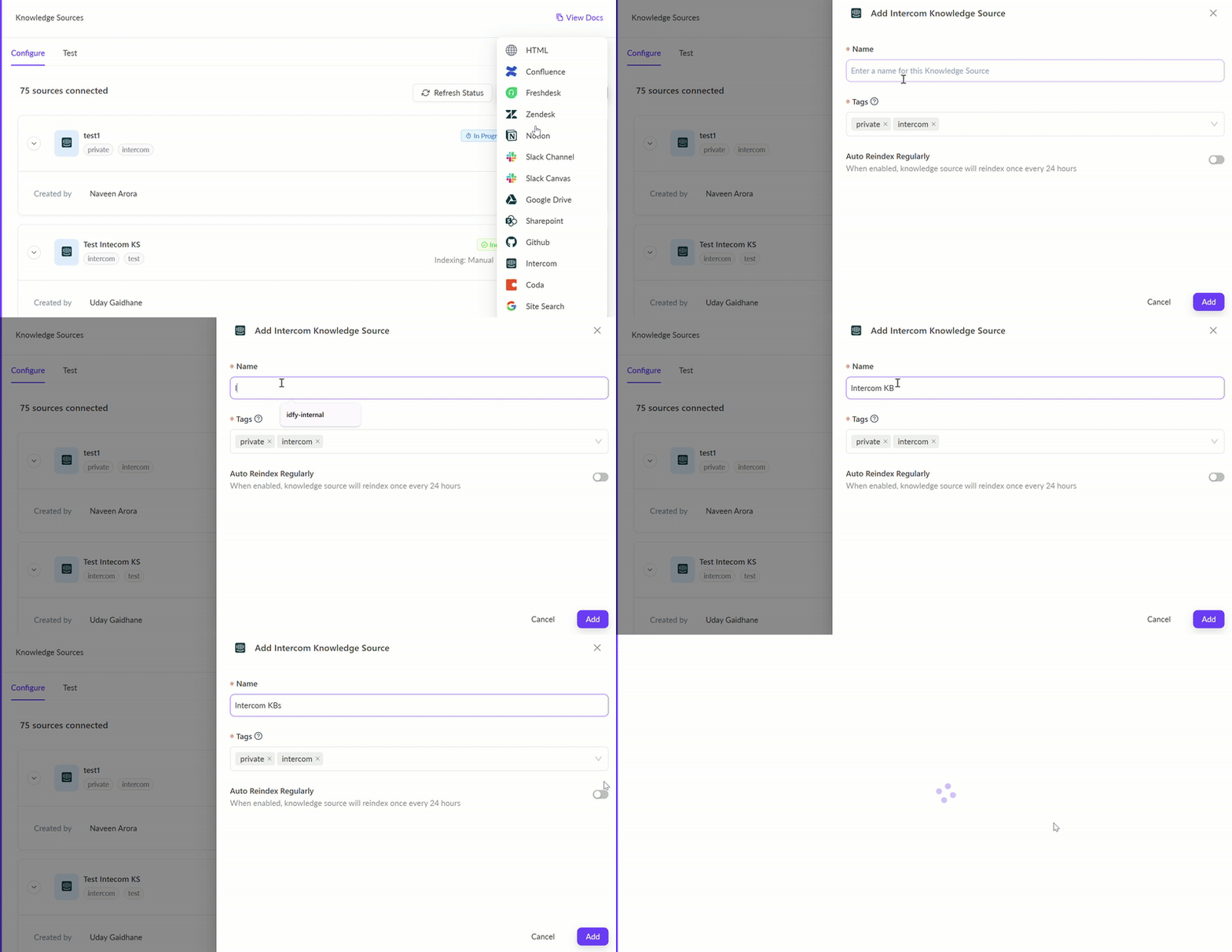
Indexing Intercom Knowledge Source
**Step 1**: **Add your first Knowledge Source**
* From the left navigation bar on the ClearFeed WebApp, go to **AI >** [**Knowledge Sources**](https://web.clearfeed.app/knowledge-sources)**.**
* Hover over the "Add Knowledge Source" dropdown at the top right corner to select `Intercom`.
* A side drawer will appear, prompting you to provide specific details:
* **Name:** Assign a title for the Knowledge Source to be displayed on ClearFeed.
* **Tags:** Use tags to categorize and structure each Knowledge Source. Customize these based on your needs.
* **Auto Reindex Regularly:** When enabled, the particular knowledge source will reindex once every 24 hours.
* After saving, the Knowledge Source will either start indexing immediately (reflected by an **In Progress** status) or will be picked soon (reflected with an **Initiated** status). Get more details on Managing Knowledge Sources [here](/clearfeed-help-center/clearfeed-ai/knowledge-sources/managing-knowledge-sources.md).
* **Reindexing Intercom Docs -** To reindex Intercom documents, manually reindex the knowledge source by clicking the "Reindex" button next to it.
Reindexing Intercom Docs
### Using AI Agents
Once you've configured the knowledge sources, learn how to build and use AI Agents
{% content-ref url="/pages/BG6lBe8zAALu5HQvWnQQ" %}
[Build AI Agents](/clearfeed-help-center/clearfeed-ai/ai-agents/build-ai-agents.md)
{% endcontent-ref %}
{% content-ref url="/pages/KfSu1GlJW2NmCvxVTv5c" %}
[Use AI Agents](/clearfeed-help-center/clearfeed-ai/ai-agents/use-ai-agents.md)
{% endcontent-ref %}
### **Manage Knowledge Sources**
Once the status of the knowledge source has been indexed, learn more on how to manage the knowledge source below.
{% content-ref url="/pages/4mEyGIe8R45x3rjcY7ug" %}
[Manage](/clearfeed-help-center/clearfeed-ai/knowledge-sources/managing-knowledge-sources.md)
{% endcontent-ref %}
%20(1)%20(1)%20(1)%20(1).png?alt=media)