> For the complete documentation index, see [llms.txt](https://docs.clearfeed.ai/clearfeed-help-center/llms.txt). Markdown versions of documentation pages are available by appending `.md` to page URLs; this page is available as [Markdown](https://docs.clearfeed.ai/clearfeed-help-center/clearfeed-ai/knowledge-sources/indexing-knowledge-sources/freshdesk.md).
# Freshdesk
Guidelines to add and index your private Freshdesk Knowledge Sources
{% hint style="info" %}
**Note:** You cannot index your Knowledge Source if you are on Freshdesk's **Free plan.** This is because making API calls to Freshdesk is unsupported in this plan.
{% endhint %}
Prerequisite - Integrating with Freshdesk
To index your Knowledge Source, you must integrate your Freshdesk account with ClearFeed.
1. Navigate to `Settings` from the nav-bar, and proceed to the [Integrations](https://web.clearfeed.app/settings/integrations) tab.
2. Within the list of available integrations, locate and select **Freshdesk.**
3. Press the `Connect` button. You will be asked to enter the Freshdesk sub-domain, as well as the API Key of your Freshdesk Account which once done, you should click on the connect button.
4. This will direct you to the Freshdesk sign-in page. Fill in the credentials and sign in. This step isn't required if you are already signed in to your Freshdesk account.
5. Once you sign in, you will be redirected to ClearFeed, and your integration will be completed.
### **Indexing a Freshdesk Knowledge Source**
With the integration complete, you can now index your Knowledge Source:
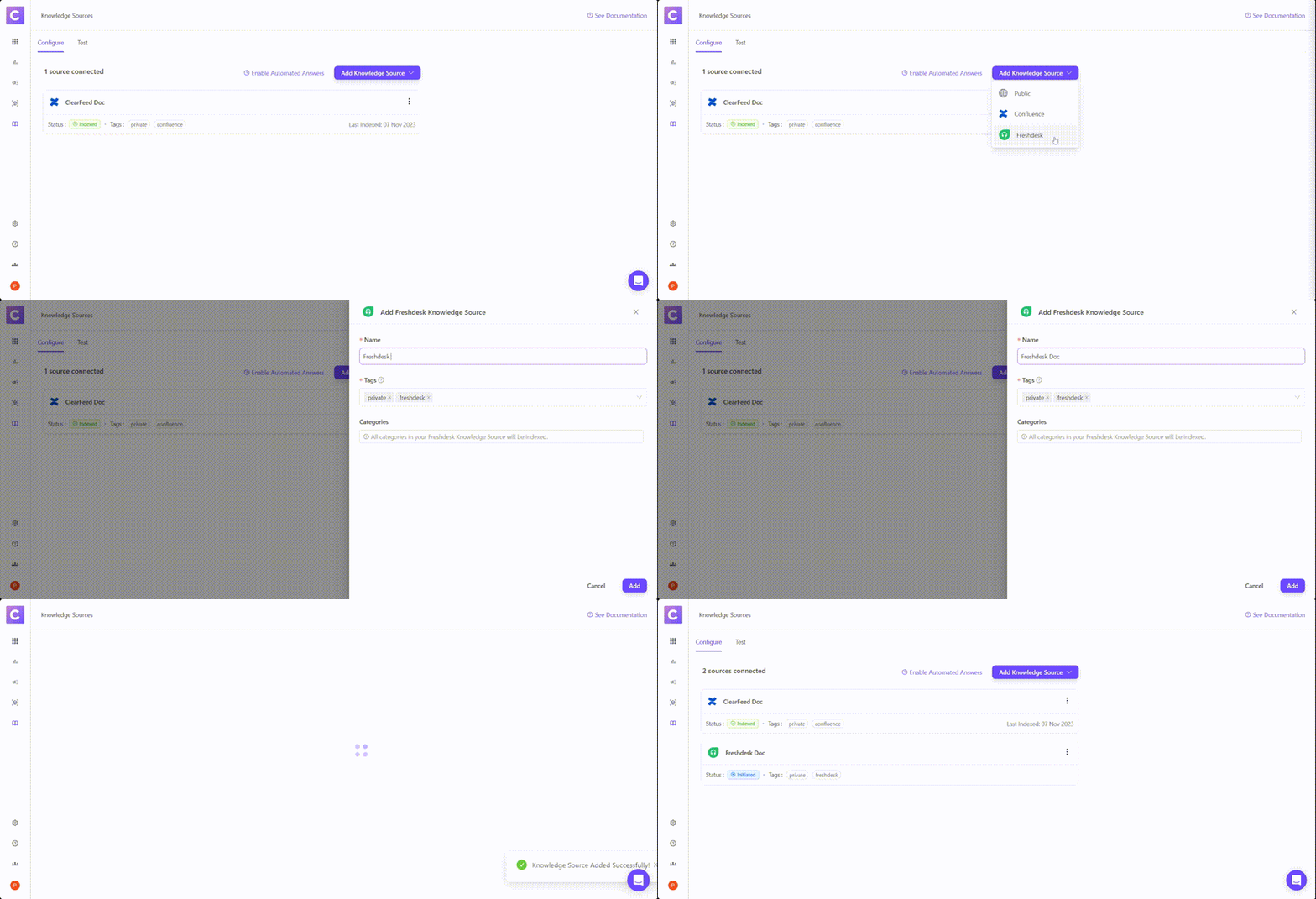
Indexing a Freshdesk Knowledge Source
**Step 1**: **Add your first Knowledge Source**
* From the left navigation bar on the ClearFeed WebApp, go to **AI >** [**Knowledge Sources**](https://web.clearfeed.app/knowledge-sources)**.**
* Hover over the "Add Knowledge Source" dropdown at the top right corner to select `Freshdesk`.
* A side drawer will appear, prompting you to provide specific details:
* **Name**: Designate a title for this Knowledge Source, which will be displayed on ClearFeed.
* **Tags**: These are identifiers linked with every Knowledge Source, aiding in categorization and structuring. Customize tags based on your needs. **Note**: *Freshdesk* will be a default tag.
* **Auto Reindex Regularly:** When enabled, the particular knowledge source will reindex once every 24 hours.
* After saving your addition, the Knowledge Source will either start indexing immediately (reflected by an **In Progress** status) or will be picked soon (reflected with an **Initiated** status). Get more details on Managing Knowledge Sources [here](/clearfeed-help-center/clearfeed-ai/knowledge-sources/managing-knowledge-sources.md).
* **Reindexing Freshdesk Docs -** To reindex Freshdesk documents, manually reindex the knowledge source by clicking the "Reindex" button next to it.\\
Reindexing Freshdesk Docs
### Using AI Agents
Once you've configured the knowledge sources, learn how to build and use AI Agents
{% content-ref url="/pages/BG6lBe8zAALu5HQvWnQQ" %}
[Build AI Agents](/clearfeed-help-center/clearfeed-ai/ai-agents/build-ai-agents.md)
{% endcontent-ref %}
{% content-ref url="/pages/KfSu1GlJW2NmCvxVTv5c" %}
[Use AI Agents](/clearfeed-help-center/clearfeed-ai/ai-agents/use-ai-agents.md)
{% endcontent-ref %}
### **Manage Knowledge Sources**
Once the status of the knowledge source has been indexed, learn more on how to manage the knowledge source below.
{% content-ref url="/pages/4mEyGIe8R45x3rjcY7ug" %}
[Manage](/clearfeed-help-center/clearfeed-ai/knowledge-sources/managing-knowledge-sources.md)
{% endcontent-ref %}